To self host or not to self host, that is the question
Table of contents
Introduction
I was recently asked about some technologies usually related to self‑hosting and, after I answered that I am already using most of these things, I was asked why I do not write about them. This made me start thinking about it.
The problem is that self‑hosting means something different for each of us, depending on each person’s needs, so a detailed article about what I use would probably be of interest only to technical people and not so much to people with a non‑technical background, but who might still need to self‑host some services.
So instead of going deeply into the technical details of what I use, I will explain which technologies I use and how I combine them, and I will try to keep the focus on some issues that most people face, in order to make this article as useful as possible, starting with the main question: why self‑hosting?
Why Self-Hosting?
The definition of self‑hosting varies depending on who you ask. For some people, it means self‑hosting a website. For others, it means significantly more. We can self‑host almost everything — we can replace most major cloud providers with locally hosted services. This includes data storage, multimedia, email, social media, photo‑sharing apps, collaboration apps — you name it.
Not everyone needs all of these, and a lot of people are quite happy using the services provided by the major tech companies. They might want to have only one or a few of these services locally hosted.
First of all, we need to answer the question: why would anyone want to host their own services?
Privacy
We will start by mentioning that, in almost every case, when we are using a publicly offered solution, our expectation of privacy should be zero. Even though some cloud providers support encryption, most major consumer solutions are not end‑to‑end encrypted.
This means that any government in the world can request that your cloud provider decrypt your files and hand them over. It also means that your favorite email provider (Google, Microsoft, Apple) is reading your email. Facebook is reading your private chats.
This includes data files, chat histories, photos, videos, and books. Everything stored in a public cloud can be handed over to the authorities. Of course, as an upstanding citizen, you might think, “I have nothing to hide; I am not afraid of the authorities.”
Things are not that simple. First of all, not all governments are democratic, and quite a few profile their citizens in order to control them. So if you say that you have nothing to be afraid of, then you are lucky to live in one of the countries where there is no racism or discrimination based on skin color, political ideas, or religion.
Last time I checked, there are only a handful of countries that fall into this category.
So I would suggest you reconsider and look around you. See if there are any incidents of racism and discrimination in your communities — if there are, then you are also vulnerable. It does not matter what color your skin is or your religion.
Trends change, and the people who hold the keys to power change as well. Today, you might not be targeted by those in power, but tomorrow you might be.
So one of the reasons you might want to self‑host is to have true privacy.
Independence
Another reason is that you may want to be independent. We have seen public cloud providers locking in their users and then asking for money — the users cannot leave and go to another platform, so they have to pay up. We have seen that major players in the tech industry (i.e., Google) do not allow you to delete all of your photos in one go in order to move to another service.
You have to download them in batches, and if you used to host your data with Google and have several dozen GB, then you are out of luck. If you are technical, you can script the process. If you are not, then you are locked in.
Similarly, Flickr suddenly changed their pricing model and started asking for money from people who had photos on their platform. Anyone who had set up their workflow to upload their photos to Flickr automatically was effectively locked in and done for.
They kept threatening to delete my account and photos for months. I just ignored them, but I was so annoyed by this that I stopped taking photos for a long time. Eventually, I found that there was a tool that could export a Flickr library and import it to other platforms. This was the first step toward hosting my own Pixelfed instance.
Another fairly common issue is when someone is locked out of their own account.
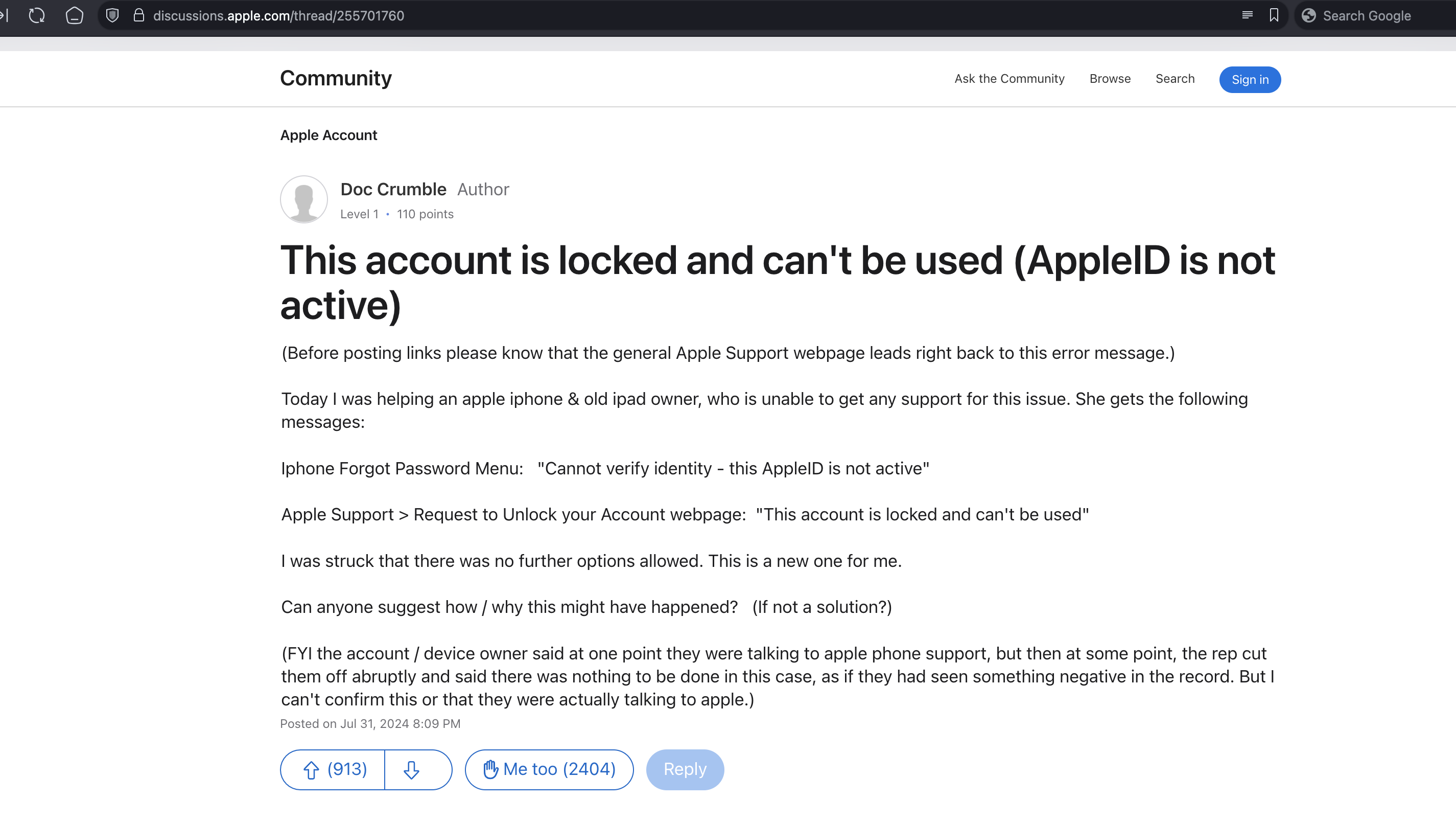
We have seen several cases where the major tech companies lock people out of their accounts for various reasons. When this happens, you are screwed. You lose access to all of your apps, all your email, and all of your data.
It is a really good idea to keep your own copy of your data.
Common Patterns
These are common patterns that apply to everyone. Everyone has email, everyone has data, and everyone does messaging. Some people might be doing more, but every single person who uses modern technologies has a collection of data that they need to access and a group of people that they need to connect with, collaborate with, or talk to.
This is the first step toward self‑hosting: owning your own data.
Hosting
Data Hosting
This part of self‑hosting is actually the easiest of all. There are several major companies that offer Network Attached Storage (NAS) solutions.
Some of these are turnkey solutions. You just plug a box into power and network, and you have a full solution that can be used to store data, view photos, read emails, host web pages, write text files, use spreadsheets, back up phones, and collaborate with other people.
They are multi‑tenant solutions, which means that one device can be used for a whole family — each person with their own account — or an office/company.
Synology
The most prominent of these companies is Synology. Synology offers a full range of solutions — for both consumers and companies. I am a proud Synology owner/customer and have been for more than a decade.
Synology is not very cheap, but it offers a lot of value for your money. Another problem Synology solves is data access. It offers the QuickConnect service, which allows users to connect to their NAS from anywhere in the world.
Please remember that Synology offers apps for mobile device photo and data backup. These two combined offer similar functionality to native Android and iOS cloud support for media and backups — without the privacy and lock‑in issues mentioned earlier.
In addition to its main purpose as data storage, Synology offers beefier models that can be used to run services, either directly on the NAS itself or as containers. This means that you can host workloads on a Synology as if it were a public cloud provider.
My Synology systems are not powerful enough for this, so I am using an alternative method. We will come to that shortly.
QNAP
Another prominent company in this space is QNAP. QNAP offers a similar range of products to Synology — from small systems oriented toward consumers and home users all the way to systems oriented toward companies and offices.
They also provide an integrated solution, and they are better priced than Synology. The reason I have chosen Synology over QNAP is that their platform is better tested and more stable. You really do not want to risk messing up your data store with an unstable OS upgrade.
FreeNAS/TrueNAS
FreeNAS/TrueNAS is the open source/free software community’s response to the proprietary solutions offered by various companies. Originally developed back in 2005 based on FreeBSD, FreeNAS grew and matured into TrueNAS, an enterprise NAS solution with support for OpenZFS, jails, and more.
TrueNAS can be a more budget‑friendly solution but may require technical knowledge and/or an investment in time that might or might not be an option for the user.
Name Resolution
The second most common service for self‑hosting is a private name resolver. It may not be obvious because the way name resolution works is transparent — no one who is not technical wonders how this service works — but the truth is that whoever controls name resolution controls where you connect to.
There are specific attacks that can redirect a user to a fake site, and a whole lot of infrastructure in place that allows us to check if a site is who it claims to be. Usually, we use our ISP’s name resolution service.
This allows them to control where we connect to, and it is a fact that one of the first types of blacklisting on a country level happens on this service. If your ISP or your government wants to prevent you from accessing a service, this is one of the first things they will do.
They will blacklist their domain. In addition to this, often the ISP DNS servers are not very stable, so it might be a good idea to not use them anyway.
Luckily, it is easy to work around this issue by using one of the DNS services available from major providers (Google, Cloudflare, etc.). This solves the potential performance issues but moves the control from your ISP to a major tech company that might have their own agenda.
The solution to this is to run your own DNS server. If you have one of those fancy Synology NAS systems that can run workloads, you can use it to deploy a custom DNS server. Alternatively, you can use a cheap Raspberry Pi.
Pi-hole
There is a user‑friendly DNS software package called Pi-hole. Pi-hole is designed to mostly act as a caching nameserver and ad blocker. It can be deployed as a container or a regular Linux service on a Raspberry Pi or in a VM.
This means that it expects you to send your requests to it, and it will ask the official upstream DNS servers for an answer and then cache this answer for any future similar requests. In addition to that, it also supports blocking common known domains that are used to serve ads.
Why Blocking Telemetry and Ads Is a Good Idea
Pi-hole was originally designed as an ad blocker. It takes a leaf out of your ISP’s book and, instead of letting them control which domains resolve for you, lets you do it yourself. This means that you can blacklist certain domains that are used to track you or show you ads.
Online tracking and advertising go hand in hand. All of our interactions on the internet are being monitored by the major tech players. This is one of the reasons why you might not want to use one of their DNS servers. This telemetry is then used to profile you and serve you ads.
You might ask, why should you bother doing this?
Privacy
Well, you can scroll up a few paragraphs and read the section about privacy again. Why should Facebook or Google know who you are, what your favorite color is, or your shoe size? Why should they know what your favorite restaurant or sports team is?
It is very difficult to avoid this kind of tracking, but one of the ways you can get some privacy is by blocking trackers and ads.
But there is a second reason you might want to block ads.
Security
It is called malvertising. Ads are a known method used to spread malware. It is one of the most common ways — most likely the second most common after phishing — of how malware spreads.
It is very easy for a non‑technical person to be tricked into clicking either intentionally or unintentionally on an ad and then, instead of taking the user to the advertising company’s website, have malware installed.
The major ad companies (again, Google, Facebook, and friends) do not really do any validation of the ad payload. They sort of assume that all of their advertisers are legitimate companies promoting a product, but this is not the case.
Performance
A final reason why you may want to block ads is performance. Ads consume resources. They consume memory, CPU, and bandwidth. Quite often, they overload an otherwise simple page. Most people notice an improvement in performance and browsing experience after blocking ads for this reason.
Media
Another common use case for self‑hosting — but not as common as data and DNS — is media hosting. There are a lot of people who own collections of digital media, either films or music (or both). Some people own audiobooks. So it is quite common for all these people to want to access their media on all of their devices.
Managing media collections across several devices is a tedious thing, especially when you want metadata like cover images, actor biographies, etc. So a lot of people self‑host a service for this.
Why Not Use Online Streaming?
Of course, most people will ask why they should bother hosting a service for media when they can just use Netflix.
The answer is that Netflix, Disney+, and Audible cost money, and they do not always have what you want. They have limited licenses to the majority of titles they host, which means you cannot watch your favorite series whenever you want (in my case, the series that started all this is Star Trek: The Next Generation).
Also, some of the platforms are quite busy enshittifying the whole experience by introducing ads even though you are already paying for the service. I have lost count of how many times my X-Files viewing was interrupted by Amazon Prime ads.
On the other hand, if you buy your movies as second‑hand DVDs from eBay, rip them, and watch them as many times as you want, you can do so freely. You can also download your podcasts locally and listen to or watch them on any of your devices without depending on YouTube, Spotify, or any other major platform.
You can even automate this.
There are several older films/movies or even presentations/instructional videos that are public domain or that you have paid for, and you can download them for your own pleasure/training needs.
Plex
This is exactly what I have done. I have a collection of DVDs of favorite movies/series; I have ripped them and host them in my Plex. Again, if you are the happy owner of a fancy Synology, you can host the service and the data on your Synology.
If you do not have a powerful enough Synology, then again you can host Plex either on a Raspberry Pi or a Linux system (either physical or virtual). The process is fairly straightforward and well documented.
You can use it for all your videos, music, and audiobooks, and it will automatically detect the metadata of each of your files and show it to you when you want to view or listen to it.
It supports playlists and collections for the organization of your files.
Plex Issues
Not everything is rosy in the Plex world. Even though they offer apps for all platforms and you can also use the service from a browser, the apps are not free. You have to pay a subscription or buy a lifetime pass.
I paid for a lifetime Plex Pass many years ago and have been using it ever since.
In addition to this initial cost, Plex is gradually moving away from an open ecosystem that allows third‑party plugins toward a walled ecosystem that is ad‑supported. It will not show ads on your own media, but it allows you to stream movies from their own catalog while they show you ads.
As you might have noticed, I am not a fan of ads, so what applies to Google and Facebook also applies to Plex. If you block the ads, the service is not otherwise affected. It is hosted locally on your own system, after all.
Another potential issue you may have is that the metadata detection might be a bit finicky. It requires specific naming of your files; otherwise, it might not work as expected, and you may end up with misidentified films.
Jellyfin
An alternative solution to Plex is Jellyfin. It is an open source, volunteer‑built media solution that does exactly what Plex tries to do — without the corporate agenda.
Jellyfin is younger than Plex, and it did not exist when I started setting up my personal media collection; otherwise, I would most likely have chosen it.
It uses a server/client architecture in the same way Plex does, where the server holds the collection and all metadata, and the clients connect to it and stream data from it. There is extensive support for clients on all major platforms.
Managing Your Services
So far, we have provided examples of three different services that someone might be interested in self‑hosting and given the reasons why they might want to. The list is non‑exhaustive, and most people host even more services.
After a while, even a technical person might find the management of all these services a chore, so the next question is: is there any way to make management of these services easier?
The answer is yes, and there are several solutions to this problem. One of these solutions is YunoHost.
YunoHost is a service management platform that can be used to automate and manage the lifecycle of services. It supports a large number of services, including Pi-hole, Plex, Jellyfin, and more.
It can be used to deploy the services, update them, create users, take backups, and finally uninstall the services.
It supports a Single Sign‑On (SSO) page, which means that you can access all your services by using one username and password.
You can also read more about YunoHost and self‑hosting in Elena Rossini’s very nice blog posts here and here.
Accessing Your Services
All right, so now you have quite a few services hosted at home: you have your Pi-hole that protects you from spammers and advertisers, you have your data on your NAS with your self‑hosted productivity suites, and your media library with Jellyfin or Plex.
But you can only access them when you are home. What happens when you are commuting or traveling abroad for work or holidays? Do you need to replicate your podcast setup on a different podcast player? Copy your films to your phone or your iPad so you can watch them when away?
Of course you could do that, but you do not really have to unless you happen to be somewhere without internet access, such as an airplane.
The Old Way
In the past, in order for people to use their services, they had to use Dynamic DNS and open and forward ports in their ISP router to allow incoming connections to their services. This approach did not always work great, had a lot of moving parts, and involved some technical difficulty.
There is a better way today.
The Better Way
The better way to do this is to use Tailscale. Tailscale is a company that offers consumer and business VPN solutions. It is based on WireGuard point‑to‑point VPN technology. In a nutshell, it allows us to connect all of our devices together using a virtual private network called a tailnet.
Tailscale supports all major platforms, including Linux. After enabling Tailscale on your mobile device and your Plex/Jellyfin instance, you can access it as if you were at home.
The installation is straightforward, and Tailscale offers a free tier that allows you to connect more than 100 devices to your tailnet. This way, you can easily access all of your services without having to mess with Dynamic DNS or port‑forwarding rules on your router.
You can even configure one of your systems at home to act as a gateway, which means you can use Tailscale on your phone and iPad while away to browse the internet and appear as if you are connecting from home.
The whole communication is encrypted, so you can use this instead of a VPN. The main difference is that you do not have many exit points to choose from. But it is a cracking feature since it means that by using your domestic connection, you can access all of your regular services even if they are geo‑fenced.
While regular VPN solutions might be blocked, your own network connection will not be, because it is a residential IP and not an IP owned by a VPN company. So if you want to access any streaming services or other geo‑fenced services when abroad, you will not have any issues.
Website
So far, we have covered services that someone needs and they can host in their own home for their own use, but how about hosting a service not for their own personal use but for other people? A good example of this is a website.
If you read Elena’s blog post, you might have noticed that she is using YunoHost with a Virtual Private Server (VPS). This is most of the time the correct way to go about it if you want to host a website, especially if it is a commercial one.
But would it be possible to host a website at home, not open any ports on your router for the outside world, and yet make it available to everyone?
The answer is yes.
Cloudflare offers a free service called cloudflared (Cloudflare Tunnel client). It is an agent that allows us to create a tunnel between our own system and Cloudflare systems.
It is designed to use Cloudflare’s proxy service to forward any HTTP requests coming to their side to our system without us having to expose any of our internal network to either the outside world or to Cloudflare itself.
In order to use this service, you need a domain registered with Cloudflare that will be used to establish the tunnel and the agent running on the system that is going to accept the connections. Then you can use this tunnel to host any HTTP service.
If you combine this with YunoHost and virtual hosting, you can use one system to host multiple services — your own Pixelfed, your own website, your own Mastodon — from one Cloudflare tunnel and one system in your closet, for free.