Keeping infrastructure up to date with the Phoenix server pattern
Table of contents
The problem
One of the classic challenges any infrastructure team has is that they need to keep their infrastructure up to date and secure.
This is eventually achieved by using various scanning tools that detect vulnerabilities in the systems and by designing elaborate patching schedules that are meant to solve this problem.
Container-based workloads are also vulnerable to this issue, because most product teams focus on delivering their features and do not spend enough time thinking about the base containers they are using and how these can be kept up to date.
Pets vs cattle
The goal may seem simple, but it is hiding a lot of complexity. It has been discussed extensively and a lot of ideas have been put forward about potential solutions.
A classic idea is that we should be treating systems as cattle and not as pets.
This means that if a system is sick, we do not fix it. We just kill it and replace it with a new functional system. This idea has in itself given birth to the concept of immutable infrastructure, which in turn is the foundational idea of container-based computing that has given birth to modern cloud computing.
This is a great concept, but it covers only the use case of when a system is broken; it does not cover how to make sure that our infrastructure is always secure and patched.
The pets vs cattle discussion suggests that instead of spending time fixing a system we should be replacing it. But replacing it with what exactly?
Also, what do we do with infrastructure that is not stateless or immutable? How do we ensure that this is going to be secure as well?
In this article we will answer this question by explaining the Phoenix server pattern for traditional as well as container-based workloads.
The Phoenix server pattern
The Phoenix server pattern is a flavour of the pets vs cattle idea. It suggests that instead of waiting for a system to break so we can replace it, we do this proactively.
We do this for our whole fleet in carefully defined intervals in such a way that every few months we will have replaced our whole fleet with zero downtime.
This concept can be applied to both traditional virtual machine or physical-systems-based infrastructure as well as container-based infrastructure.
The basic requirement in order to achieve this is to have a mature and robust automation framework with full testing and quality gates that will do some of the following in an automated way:
- Build base images (virtual machines and containers)
- Test base images
- Certify base images by running tests for all the components of our product at build time (unit testing)
- Deploy base images to a staging environment, apply prod-like configuration and datasets, and run tests (integration/E2E testing)
- Tag and release new base images for general use
- Assuming everything is approved, start a gradual replacement of existing systems by using these new base image releases
- Ensure that by the end of a certain period the whole fleet has been updated and refreshed
Of course, the exact implementation depends on the nature of the service, so this is an indicative list.
The benefits
The benefits of following the Phoenix pattern are many.
- Your systems are always up to date with very few security issues.
- There is no snowflake configuration; everything is controlled.
- Your automation is exercised on a daily basis.
- Your testing suite and quality gates are top-notch.
- Your monitoring and alerting solutions are also top-notch.
- Your systems are always compliant.
- You can use the test results as part of your compliance submissions.
- Getting certified for PCI DSS is going to be a breeze.
The risks
As always, with great power there is also great responsibility, so in addition to the benefits there are also great risks. As mentioned in the three ways of DevOps, if you make a mistake and your testing/monitoring/alerting is not robust enough to catch it, then the risk of a global outage is very high.
We have seen this happen to all top players in the field. It has happened to Amazon, it has happened to Cloudflare, it has happened to Twitter, Facebook, etc.
Building the infrastructure
In this section of the article I am going to present how I have done this in the past. But this is just one way of doing this. Also, as always, the devil is in the details, so your implementation may have to differ because the architecture of your service dictates it.
But the pattern should hold and the eventual benefits should persist. I will cover two scenarios: one for traditional workloads (VM/physical-based) and one for container-based workloads.
I will use a fairly simple architecture for illustration purposes, but in many cases in real multi-master highly available services, these examples will have to be redesigned in order to fit the needs of the specific service you want to maintain.
Traditional architecture
Preparing and verifying the base image
In a traditional architecture we usually have a service that has several components that are usually using the same underlying platform, and each component may have its own configuration management role as described in my automated configuration management for non containerised workloads article.
For the sake of this example, let us assume that this common platform is an Ubuntu Linux distribution.
In order to implement the Phoenix server pattern we need to be able to build images for our target architectures from scratch. I have done this in the past by using Hashicorp Packer; our target architectures were Amazon, VMware and Xen.
We were using VMware for our production environment, Xen for our development environment and Amazon EC2 for our DR environment.
We can see this architecture in the following diagram.
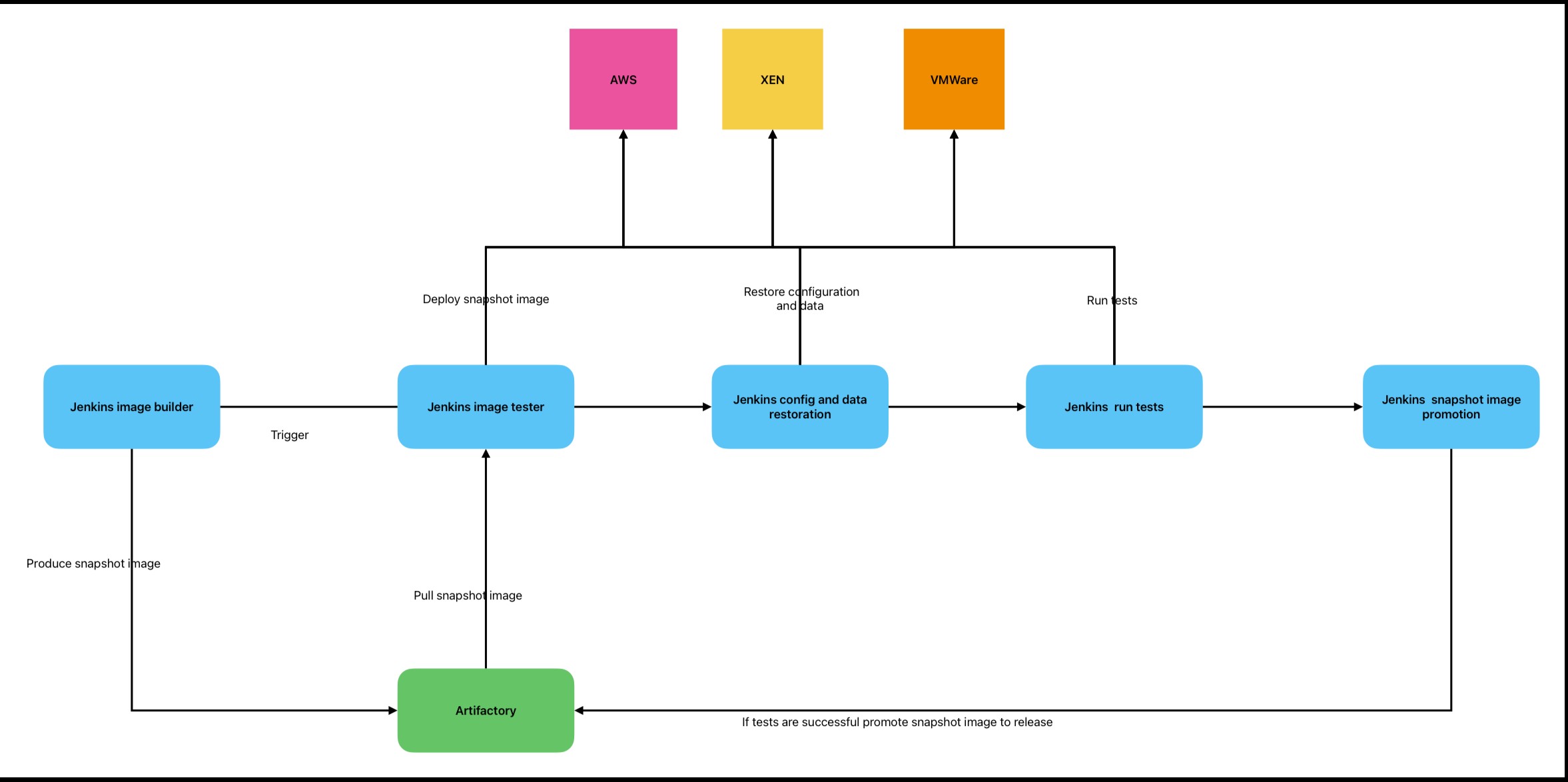
If the image is too small, please right click on the image and open it in a new tab so you can zoom in.
This is a base image creation and verification pipeline, but each step is meant to be a placeholder for domain-specific operations. This means that you can replace each step with the operations you need. For example, in the “run tests” step you can verify potential kernel drivers you need, and then run tests.
Even though this is a base image creation pipeline diagram, it can be extended further to produce complete appliance images that can be delivered to the customer as ready-to-install images to their platform of choice.
I have done this in the past when this pipeline contained integrations with Jira, contained steps for virus scanning and key signing of the various artefacts contained in it, up to the point where it even produced PDFs that were ready to be printed for DVD cases for the customers that required this image to be delivered on physical media.
Deploying the image
After the creation of the base image we are ready to start the gradual rollout.
This is the most sensitive step of the operation, since it requires automation to prevent the execution of the next replacement if one replacement has failed, and robust monitoring and alerting to notify the owners of the systems that a replacement has failed.
The rollout also depends on the nature of the service.
For example, in a highly available service with load balancing you can spin up a new service, do the deployment and configuration using your configuration management system (maybe using something similar to the method defined in my previous article here), and when everything is ready run tests to verify if the new system is healthy, then destroy one of the older instances.
Repeat the process until all the older instances have been replaced.
Container-based architecture
Preparing and verifying the base container image
If you are using containers instead of virtual machines or physical systems, then everything is a lot easier. You have only one target platform to worry about, and your application is meant to be stateless.
You can reuse the same pipeline to produce your base image with all the latest patches installed, run your tests and produce your base image to your artefact repo.
After testing, promote the snapshot version created to a released version which will then be used by other pipelines to produce the final artefact that contains your service.
Deploying the image
Kubernetes supports the rolling restart strategy out of the box, so all you need to do is bump the version of your artefact to the latest release and Kubernetes orchestration will do the rest for you.
Final thoughts
Using this approach we move the focus of operations from day-to-day management of long-running systems to making sure our automation and monitoring are robust. In these situations automation, monitoring and alerting are key for the detection of faults as early as possible, ideally before even a base image is released.
There are huge benefits in doing so, because this means that all of our infrastructure is defined as code, there are no hidden configuration files that nobody knows anything about, and everything is peer reviewed and monitored.
This promotes standardisation and knowledge transfer with well-defined alerts and runbooks that will help resolve any issues with minimal disruption.